FAQ chatbot vs business AI agent: the difference that changes everything
Most chatbots deployed in SMEs answer generic questions: opening hours, returns policy, company presentation. Useful, but far from exploiting the real potential of an AI agent connected to your operational data.
A business AI agent is a different category. It does not read pre-written texts; it queries your existing tools in real time: CRM, ERP, invoicing software, scheduling tool, customer history. It answers with live, personalised, contextualised data.
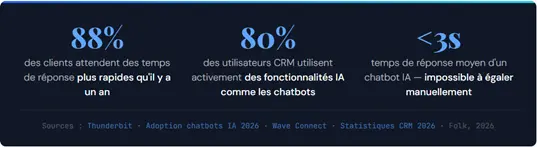
The question is no longer “do we need an AI agent?” According to Thunderbit, 77% of CRM managers say they already use AI in their customer service. The real question is:does your AI agent answer the right questions, the ones that really save your teams time?
Here are the 5 questions your sales reps, managers and assistants ask every day, and that your AI agent should be able to resolve instantly by checking your tools live.
Question 1: “Where is this client in our CRM?”
It is the most frequently asked question in any sales team:“Where is Company X in our pipeline?”Without a connected AI agent, the answer means opening the CRM, finding the record and reading the notes. 2 to 4 minutes per question. Multiply that by the dozens of times this question is asked every week.
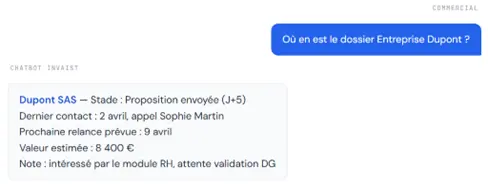
This answer draws on your CRM, your activity notes and your pipeline in real time. Without any manual search. 32% of sales reps spend more than an hour a day manually entering data in their CRM, time that could be spent selling.
✓ What your AI agent must be able to read : pipeline stage, last activity, estimated value, next follow-up, assigned owner
✓ What it changes : zero manual searching, an answer in under 3 seconds, even on the move from a mobile phone
Question 2: “What stock is available right now?”
For any SME with physical stock (retail, industry, distribution, e-commerce), this question is asked dozens of times a day by sales reps, after-sales or field teams. The answer should be immediate. In most SMEs, it is not.
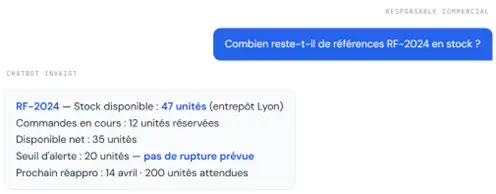
An AI agent connected to your ERP or stock management software answers by checking your data live. No call to the warehouse, no email to the logistics manager, no Excel spreadsheet to open.
✓ What it changes for your field teams: A sales rep in a client meeting can check product availability in 3 seconds from their phone, without interrupting the meeting to call the office. The answer arrives in the conversation, not 20 minutes later by email.
Question 3: “Has this invoice been paid?”
The question that paralyses sales conversations: a client contacts you and, before talking to them, you need to know whether their last invoice has been paid. Open the invoicing software, find the client, check the payment status. Another 3 to 5 minutes lost, often at the wrong moment.
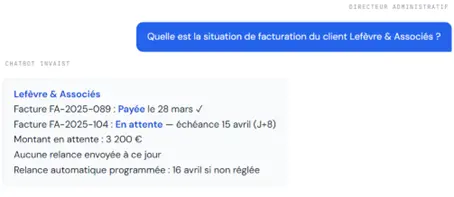
This real-time visibility on cash flow changes the way your teams interact with clients and with the figures. 80% of CRM users actively use features such as AI chatbots and automated replies, confirming that demand for this kind of instant access to financial data is very real.
✓ Without an AI agent connected to invoicing: A sales rep calls a client about a renewal without knowing that an invoice has been unpaid for 45 days. A weak position, a compromised negotiation, a risk of conflict. A connected AI agent removes this situation. The data is available before you pick up the phone.
Question 4: “What time slots are available this week?”
Whether it is scheduling a client meeting, organising a field visit or coordinating internal resources, the availability question is asked dozens of times a day. It triggers back-and-forth emails or calls that could be avoided entirely.
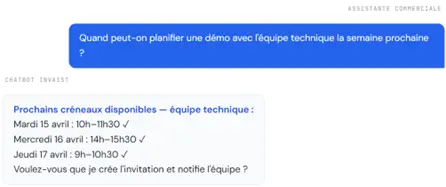
AI chatbots can carry out tasks such as order tracking and appointment scheduling, providing a service available 24 hours a day. This constant availability is particularly valuable for SMEs where scheduling resources are limited.
✓ What the AI agent can also do: A connected scheduling AI agent does not just read availability; it can create the invitation, notify the participants, add the video link and block the slot in everyone’s calendar in a single action. What used to take 10 minutes of exchanges is settled in 15 seconds.
Question 5: “What has happened with this client?”
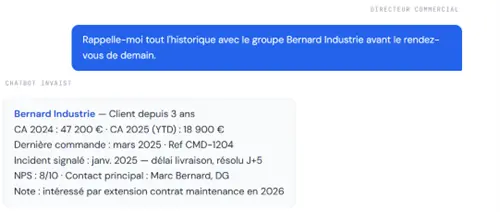
This is often the most critical question and the least well served. A client calls, a new sales rep takes over an account, a manager prepares a meeting: all of them need to understand the full context of the client relationship in a few seconds, without reading 20 emails or opening 3 different tools.
FAQ
This summary draws on your CRM, your invoicing software and your ticketing tool simultaneously. What used to take 15 minutes of preparation comes down to 3 seconds. And the sales rep goes into the meeting prepared, with the right figures and the right context.
This is whatBpifrance BigMedia (2025)confirms. AI in customer relations uses data based on user behaviour, contextual data and information from the company’s CRM to provide a personalised answer. This is precisely what a properly connected business AI agent does.
How to connect your AI agent to your business data
A business AI agent is only as good as its connection to the data. The good news: modern business chatbots integrate with CRMs, helpdesks and ERPs, and can be deployed on several channels to fit naturally into business processes without complex development.
Here are the 4 prerequisites for your AI agent to really answer the 5 questions described above:
- Centralised data: your tools (CRM, invoicing, scheduling, stock) must speak the same language. An AI agent connected to scattered data gives inconsistent answers.
- Native or API integrations: your AI agent must query the data in real time, not read out-of-date Excel exports from last week.
- Well-defined access rights: not everyone has access to the same data. Your AI agent must respect the existing permission levels.
- A tested and validated set of questions: start with the 5 most frequently asked questions, validate the answers, then expand gradually.
- Realistic deployment time: An SME can start using an AI agent through no-code platforms, using ready-made FAQ templates, then gradually integrate it with CRM tools or helpdesk services.
What is the difference between a FAQ chatbot and a connected business AI agent?
A FAQ chatbot answers predefined questions from a base of static texts. A connected business AI agent queries your tools (CRM, ERP, invoicing, scheduling) in real time to give personalised, up-to-date answers. It is this connection to live data that creates real operational value and justifies deployment in an SME.Do you need a technical team to deploy a business AI agent?
No. Modern no-code chatbot platforms let you connect an AI agent to your existing tools without development. With a specialist partner like Invaist, an operational business AI agent can be deployed in under 3 weeks. Your role: identify the 5 questions your teams ask most often.Can my AI agent access data from several tools at the same time?
Yes. This is precisely the strength of a well-configured business AI agent: it can query your CRM, your invoicing software and your scheduling tool simultaneously to build a complete, contextual answer (as question #5 on customer history shows).What ROI can an SME expect from a business AI agent?
Companies that have integrated chatbots see a 40% reduction in time spent on repetitive tasks. The average response time is under 3 seconds, compared with 3 to 15 minutes for a manual search. On the 5 questions described, a connected AI agent saves on average 45 minutes to 1.5 hours per employee per day.Does your AI agent answer these5 questions?
Invaist audits your processes, identifies the questions your teams ask most often and deploys a business AI agent connected to your existing tools. First operational workflow in under 3 weeks.
No IT team. No disruption.
No commitment · 30 min · Reply within 24h
Our related solutions